
How to Find Your UAN: 3 Working Methods If you’re trying to check your Provident Fund (PF) balance or apply for a claim, the first thing you’ll need is your UAN – Universal Account Number.
But what if you don’t know your UAN?
In this blog, we’ll guide you through possible ways to find your UAN, whether you’re a salaried individual, have switched jobs, or are simply curious about your PF.
________________________________________________________________________
What Is a UAN, and Why Is It Important?
UAN Universal Account Number. It’s a 12-digit number assigned by the Employees’ Provident Fund Organisation (EPFO) to every employee who contributes to the Employees’ Provident Fund (EPF).
If you’ve worked at multiple companies, each employer opens a new PF account for you, but all of them are linked to the same UAN.
Why do you need to know your UAN?
Knowing your UAN allows you to:
- Check your EPF balance online
- Download your EPF passbook
- File PF withdrawal or advance claims
- Transfer your PF when you switch jobs
- Track your EPS (pension) service history
Your UAN is the key to accessing and managing your retirement savings efficiently.
Method 1: Find Your UAN Using Mobile Number on EPFO Portal
This is the fastest and most direct method — works if your mobile number is linked to your PF account.
- Go to the official EPFO member website:
🔗 https://unifiedportal-mem.epfindia.gov.in/memberinterface/
- Click on “Know Your UAN” (just below the login section).

- Enter your mobile number and click “Request OTP”.
After entering the OTP, fill in your:
- Full Name (as per Aadhaar)
- Date of Birth
- Choose and enter Aadhaar, PAN, or Member ID (PF number)
- Enter the captcha code
Click “Show My UAN”
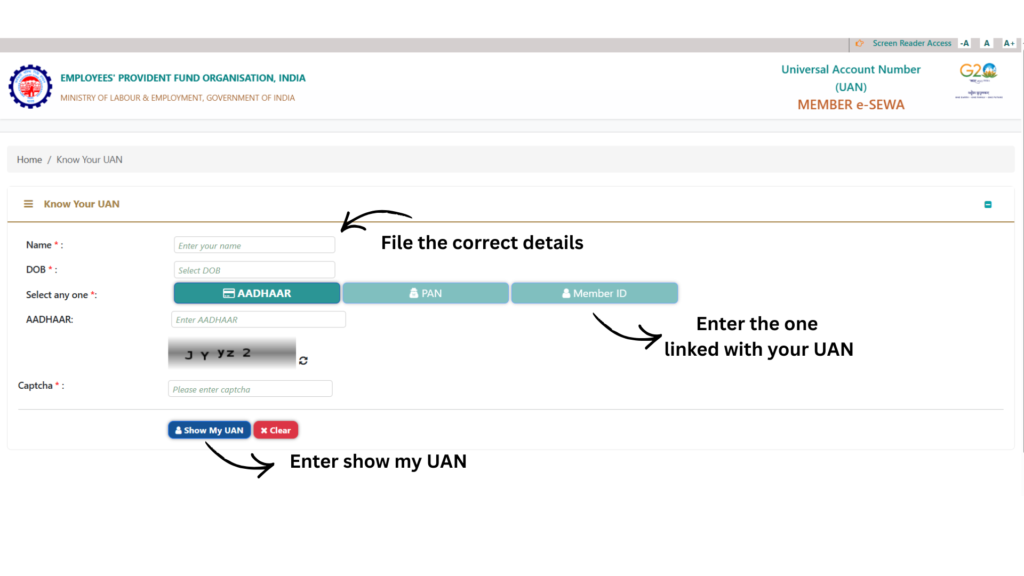
Your UAN will be displayed on the screen and also sent via SMS to your registered mobile number.
This method works only if your mobile number is linked to your UAN. If it’s not, try Method 2.
Method 2: Get Your UAN from Your Employer or HR Team
If your mobile number isn’t linked or you can’t retrieve your UAN online, your employer is your best source.
Here’s what you can do:
- Check your salary slip — many employers mention UAN on it
- Reach out to your HR or Payroll team
- Check your joining documents or PF welcome emails from the company
Even if you’ve changed jobs, your UAN remains the same. Your most recent employer can share it with you.
Method 3: Find Your UAN Using the UMANG App
The UMANG app (Unified Mobile Application for New-age Governance) is a government app that lets you access EPFO services, including viewing your UAN.
How to check your UAN on UMANG:
- Download the UMANG App from Play Store or App Store
- Login or register using your mobile number
- Go to EPFO → Employee Centric Services → View UAN
- Enter your Aadhaar or PAN, Date of Birth, and captcha
- You’ll receive an OTP — once verified, your UAN will be shown on screen
- This method is mobile-friendly and works if your Aadhaar or PAN is linked with EPFO.
Method 4: A quick way to check your UAN: CheckMyPF by FinRight!
A quick way to check your UAN is through CheckMyPF — a tool built by FinRight that lets you fetch your UAN using just your mobile number. (but remember mobile number must be linked with your Aadhaar and your UAN)
Retrieve your UAN using your mobile number: - Check total PF balance and service history
- Spot issues that might block your withdrawal
- All in one place: FixMyPF
Don’t Remember Your UAN?
CheckMyPF by FinRight makes it easy! Our AI-powered tool lets you retrieve your UAN simply by entering your mobile number. It will show all UANs linked to your phone, making it simple to access your EPF information.
Why Use CheckMyPF?
✔ Instant UAN Retrieval: Quickly get your UAN without the hassle
✔ Check Total PF Balance: View your entire EPF balance in one place.
✔ Spot Potential Issues: Identify discrepancies early that could delay your withdrawal.
✔ Safe, Secure, Easy: We prioritize your privacy with military-grade security
FAQs on Finding Your UAN
Q. Can I have more than one UAN?
You shouldn’t. If you do, raise a request to merge multiple UANs under one via EPFO grievance.
Q. Is UAN different from PF number?
Yes. UAN is your permanent identity. PF number (Member ID) changes with each employer.
Q. Can I activate my UAN online?
Yes. Once you know your UAN, you can activate it here: https://unifiedportal-mem.epfindia.gov.in/memberinterface