When errors appear in your Provident Fund (PF) records—such as a wrong Date of Joining (DOJ), Date of Exit (DOE), or mismatched personal details—the Joint Declaration (JD) form is the official route to correct them.
EPFO has recently simplified this process:
- Certain corrections can now be done online directly through the Unified Member Portal (with Aadhaar-based authentication).
- While the majority of corrections do happen online, there are still few cases where you need to submit an offline joint declaration process, signed by both employer and employee, along with supporting documents at the regional PF office.
This updated guide explains when offline JD is required, and how to fill it step by step
What is a Joint Declaration (JD) Form?
A Joint Declaration (JD) form is an official document used by the employee and the employer together to request corrections in an employee’s Provident Fund (PF) records.
It is signed by both parties and submitted to the regional EPFO office when certain details in the PF account are incorrect or missing. The PF office accepts it only when the correction is backed by both employee and employer, along with supporting documents.
Situations Where JD is Needed
According to EPFO’s rules, the JD form is required when:
- The Date of Joining (DOJ) or Date of Exit (DOE) and reason for leaving in the PF account is wrong or missing.
- Marital status is missing
- The father’s or husband’s name is missing or incorrectly recorded.
- The nationality of the individual is not updated
- The member’s name, date of birth, or gender is incorrect.
- Linking your aadhar with your UAN.
What Can Be Corrected Online vs Offline (2025 Rules)
✅ Can be corrected online (via Aadhaar-seeded portal):
- Minor spelling mistakes in name (must match Aadhaar).
- Gender or Date of Birth mismatches (if supported by Aadhaar).
- Date of Joining (DOJ) / Date of Exit (DOE)
- Can be corrected online if the entered dates match the contribution history in the employer’s ECR.
- Family details (Father’s/Husband’s name)
- Now available online for most members if Aadhaar is seeded.
⚠️ Still requires Offline JD (signed and stamped by employer):
- 1) Linking old PF accounts with Aadhar
- 2) Linking UANs that aren’t linked with Aadhar
- 3) Details corrections in case of closed accounts
- 4) Technical errors – not able to apply online
- 5) Removing EPS DOJ/DOE
👉 Rule of thumb in 2025: Try online first. If the correction is blocked due to Aadhaar mismatch, contribution mismatch, or employer errors → you need an offline JD.
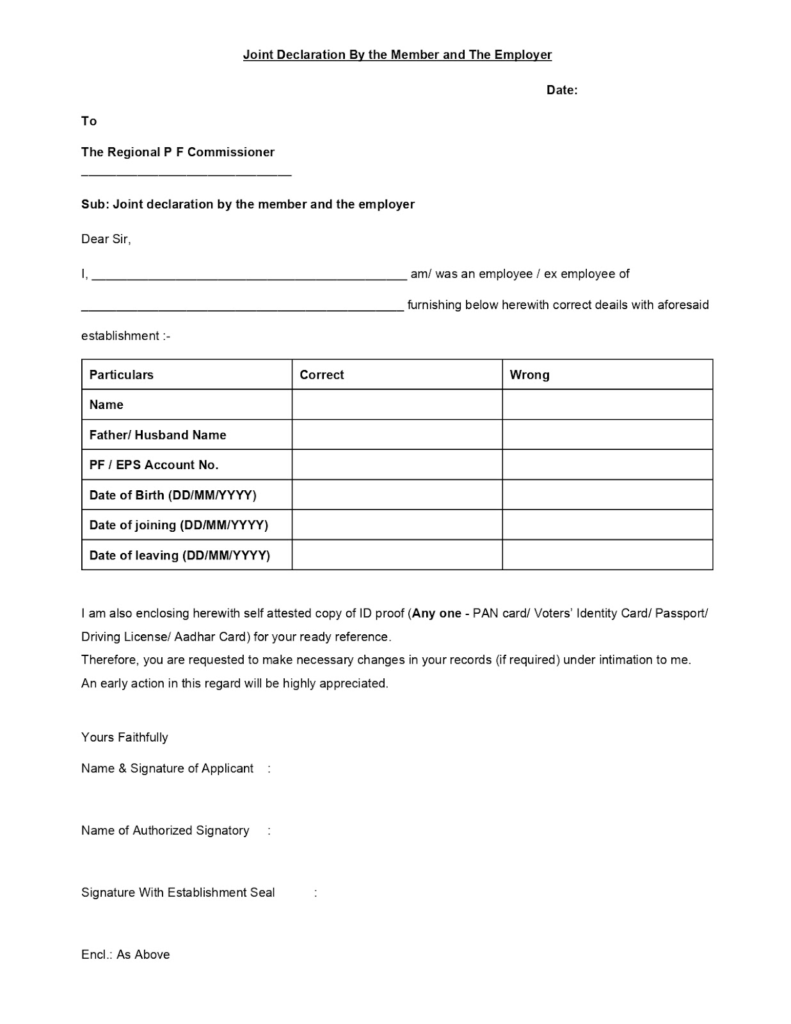
Step-by-Step Guide to Filling the Offline JD Form
1. Download the Official Form
- The Joint Declaration form is not available on the EPFO website but can be obtained from your employer or the nearest PF office.
2. Fill in Employee Details
- UAN (Universal Account Number)
- PF Account Number (Member ID)
- Employee Name (as per Aadhaar)
- Father’s/Husband’s Name
- Date of Birth
- Date of Joining & Date of Exit
- Any other detail requiring correction
3. Employer’s Details & Verification
- Employer’s establishment name & code.
- Signature and stamp of the authorized signatory.
4. Mention the Corrections Required
Be clear and specific.
- Example: “Date of Joining to be corrected from 01/04/2018 to 01/05/2018.”
5. Attach Supporting Documents
Category-Wise List of Acceptable Documents
1. Name & Gender
- Passport
- Death Certificate
- Birth Certificate
- Driving Licence
- Service Photo Identity Card (Central/State Govt./PSU/Bank)
- School Leaving Certificate (SLC) / Transfer Certificate (TC) / SSC/Marksheet
- Bank Passbook (with photo, cross-stamped by bank official)
- PAN Card / e-PAN
- Ration/PDS Photo Card
- Voter ID / e-Voter ID
- Pensioner Photo Card
- CGHS / ECHS / Medi-Claim Card / RSBY Card
- ST/SC/OBC Certificate with photograph
- Gazette Notification + Old supporting ID (for Name Change requests)
- Valid Visa + Foreign Passport (for Foreign Nationals)
- Freedom Fighter Card (with photo)
- PIO / OCI Card (Govt. of India)
- Tibetan Refugee Card
2. Nationality
- Passport
- PIO Card (Govt. of India)
- Valid Long-Term Visa (LTV) + Foreign Passport (Afghanistan, Bangladesh, Pakistan minorities)
- Valid Visa + Foreign Passport (Foreign Nationals)
- Tibetan Refugee Card
- Voter ID / EPIC
- Nationality/Domicile Certificate
- Appointment Letter / Offer of Appointment (mentioning nationality)
- Birth Certificate (if not in system, to update as “Indian”)
3. Date of Birth
- Birth Certificate (Registrar of Births & Deaths)
- Marksheet / School Leaving / Transfer Certificate (with DOB)
- Service Records (Central/State Govt. Org.)
- Medical Certificate (Civil Surgeon + Affidavit)
- Passport
- PAN Card (IT Dept.)
- Pension Payment Order (Central/State)
- CGHS/ECHS/Medi-Claim Card (Govt./PSU)
- Domicile Certificate (Govt.)
- Ration/PDS Card
- ESIC Pehchan Card
- Voter ID Card
- Photo ID with DOB (Govt./PSU/Education Institution)
- Driving Licence
4. Father’s Name / Mother’s Name / Spouse’s Name
- Passport
- Ration/PDS Card.
- CGHS/ECHS/Medi-Claim Card (with photo)
- Pension Card
- Birth Certificate (Registrar, Municipality, Tehsil, etc.)
- Marriage Certificate (Govt.)
- Photo ID (Govt. – Bhamashah, Jan-Aadhaar, MGNREGA, Army Canteen, etc.)
- PAN Card
- 10th / 12th School Certificate / Marksheet (with parent name)
- Driving Licence
- Family Entitlement Card (Govt.)
- Discharge Slip (issued in mother’s name post-delivery, Govt. hospital)
- Certificate of Identity (MP/MLA/Gazetted Officer/Municipal Counsellor)
- Department of Post issued Address Card
- Affidavit (with family head, issued by Sarpanch/Gram Panchayat)
5. Marital Status
- Marriage Certificate (Municipality / Gram Panchayat)
- Divorce Decree
- Passport
- Affidavit (by member, notarized)
- Ration/PDS Card
- Voter ID Card
- Death Certificate (Registrar of Births & Deaths)
- Family Member Certificate (Employer letterhead)
- State Govt./ECHS/ESIC/CGHS Medical Card
- Pension Card
- MGNREGA Job Card
- Identity Certificate with photo (MP/MLA/Gazetted Officer/Municipal Officer/Sarpanch)
6. Date of Joining (DOJ)
- Employee Register
- Attendance Register
- Appointment Letter / Any establishment document (Central/State Labour Act)
- Employer Letter (clearly stating DOJ, supported by ECR, signed by employer/authorized signatory)
- Self Declaration (if matching contribution received)
7. Date of Leaving (DOE)
- Resignation / Termination Letter
- Experience Certificate / Other Establishment Documents
- Wage Slip / Salary Slip / Full & Final Letter
- Employer Letter (clearly stating DOE, signed by employer/authorized signatory)
- Death Certificate (Registrar of Births & Deaths)
- Attendance & Wage Register
- FIR (if missing person presumed dead)
- Legal Heir Certificate (if missing person presumed dead)
- Self Declaration (if matching contribution received)
8. Reason of Leaving
- Resignation Letter
- Employer Letter (stating reason of leaving, supported by ECR)
- Termination Letter
- Any Document by Establishment (signed by employer/authorized signatory)
- Death Certificate (Registrar of Births & Deaths)
- Self Declaration (if matching contribution received)
6. Submission to PF Office
- Submit to your regional PF office with acknowledgment.
- Some employers may directly submit on your behalf.
⚠️ Common Mistakes to Avoid
- Submitting without employer’s attestation.
- Not attaching Aadhaar/PAN proof.
- Writing vague correction requests.
✅ Why JD Form is Important
Without correcting errors, you may face:
- Rejections in PF withdrawal claims.
- Delays in PF transfer between employers.
- Problems in pension (EPS) eligibility.
Need Help with JD Form Submission?
Filling and submitting the JD form correctly is critical for smooth PF claim settlements. Many employees struggle with employer coordination or document requirements.
If you need help with your PF withdrawal, you might consider reaching out to a PF withdrawal consultant in Mumbai, or professional PF consultants in Bangalore, Delhi, or other major cities. Many people even search for PF consultants near me to find local support.
👉 FinRight works PAN India and provides complete support for PF issues—from filling JD forms to handling transfers, withdrawals, and EPS corrections.
Key Takeaway
The offline Joint Declaration form is your official route to correct PF errors that can otherwise block your money. By carefully filling it with accurate details, attaching the right documents, and coordinating with your employer, you can ensure a smooth PF process.
Frequently Asked Questions (FAQ) on Joint Declaration (JD) Form
1. Can I submit the JD form online?
Yes, after the Oct 2017 Aadhaar-based update, many corrections like name spelling (matching Aadhaar), gender, date of birth, mobile/email, Date of Joining (DOJ)/Date of Exit (DOE), and family details can be updated online via the Aadhaar-seeded Member Portal. However, if there’s an Aadhaar mismatch or contribution mismatch, you must use the offline JD.
2. How do I correct DOJ/DOE in PF records?
- If the DOJ/DOE matches your actual PF contribution history, you can update it online.
3. What documents are required with the JD form?
- Aadhaar card (mandatory).
- PAN card (as secondary proof of DOB/Name).
- Employer’s official records (Appointment letter, Form 5/10, Salary slips, or Form 3A).
Always attach self-attested copies.
4. How long does it take for JD corrections to be processed?
Typically 15–30 days, depending on the PF office workload. In some cases, especially with old or closed employers, it may take longer.
5. Can family details be updated online?
Yes, father’s/husband’s name and other family details can now be updated online if your Aadhaar is linked with UAN.
6. What happens if I don’t correct errors in PF records?
You may face:
- Rejection of PF withdrawal claims.
- Transfer failures between employers.
- Incorrect pension (EPS) service history.
7. Do I need a PF consultant for JD corrections?
Not always. If your employer is cooperative, you can handle JD submissions yourself. However, in complex cases (like old employers, contribution mismatches, or multiple UANs), many people consult PF withdrawal consultants in Mumbai, Bangalore, Delhi, or search for PF consultants near me. 👉 FinRight works PAN India and can assist with such corrections.